
If your organization uses Expensify cards, then you may benefit from this guide!
Activity Workflow
Here is the workflow of activity on the Expensify card:
- Expensify sends an Expense transaction to QBO, which debits an expense account and credits the Expensify Card Liability Account.
- Expensify sends a Journal entry to QBO, which debits the Expensify Card Liability Account and credits the Expensify Clearing Account
- The QBO bank feed gets coded as a debit to the Expensify Clearing Account and a credit to the Checking account.
Using Expensify’s Settlement Detail Screen
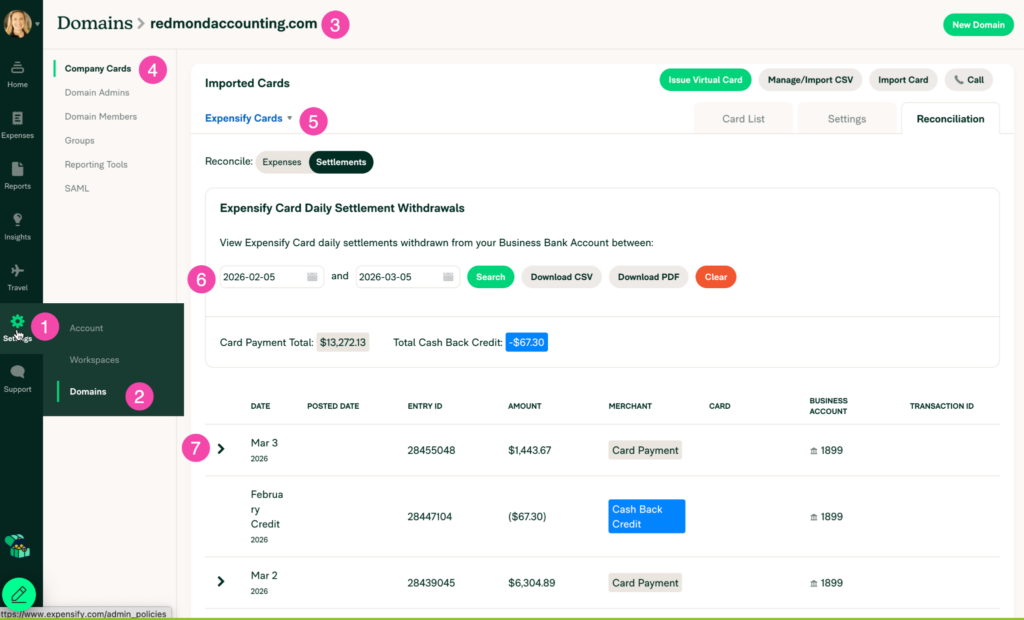
When you reconcile the Expensify Card Liability Account and the Expensify Clearing Account, it is very helpful to use Expensify’s settlement detail screen:
- Settings > Domains > [domain name]
- Company Cards > Expensify Cards
- Reconciliation tab > Settlements tab.
- Enter a date range
- Find a row and click the arrow to expand it for more details
Leave a Reply