
If you have two Expensify usernames and want to combine them into one, you can merge them. Merging accounts combines all receipts, expenses, expense reports, invoices, bills, imported cards, secondary logins, co-pilots, and group policy settings into one account.
Sign in to the Account You Want to Be Primary
Sign In to Expensify with the username of the account you want to be primary, which is the account that you want to keep and continue using.
Merge Accounts
Navigate to Settings (gear icon) > Account > Account Details. Scroll down to the section Merge Accounts.
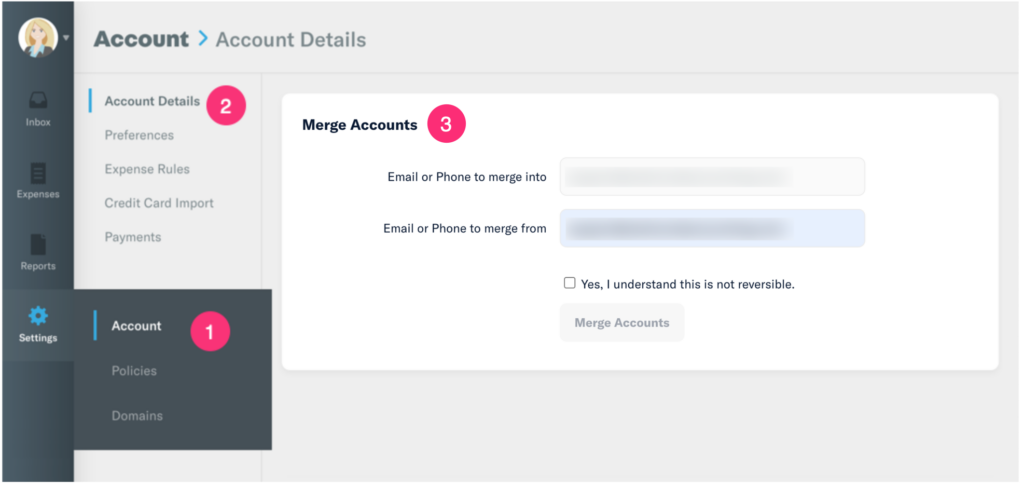
- The first field, “Email or Phone to merge into,” is already populated with the primary email address you logged in with and want to keep and continue using.
- The second field, “Email or Phone to merge from,” is for entering the secondary email address you want to stop using.
- Click the button to Merge Accounts.
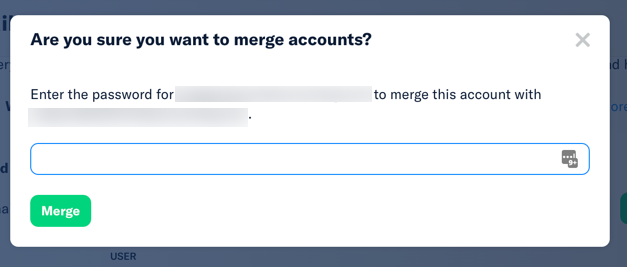
- 6. Enter the password from the secondary account that you are trying to discontinue using to merge it into the primary account. Click the Merge button.
Leave a Reply