
Introduction
When you use personal funds for business expenses, submit them for reimbursement using Expensify.
- If you frequently use a personal credit card for business expenses, you can connect your card(s) to Expensify to import purchase details: bank description (usually the merchant name), date, and amount.
- You are responsible for linking your bank account to Expensify to receive reimbursement.
- If you do not connect your personal card, you can add individual charges one at a time to an expense report for reimbursement
If you are a company credit card holder, it is your responsibility to report to the company on the purchases you make with that card.
- Once the card is linked, Expensify will automatically pull in your credit card charges as they post to your account.
- Your company credit card will be linked to your Expensify account for you. This will be done once you begin making purchases with it.
- Do not connect your company card yourself, or you will cause duplicate downloads.
- Once the card is linked, Expensify will automatically pull in your credit card charges as they post to your account.
Both reimbursable and non-reimbursable business expenses are grouped together on reports. It is your responsibility to categorize your expenses, add notes, attach receipts, and submit your reports. Some delegate this task to a co-pilot.
Capture Receipts
- Sign in to the Expensify iOS / Android app on your mobile device
- Capture the receipt via your phone camera or email
Add Details
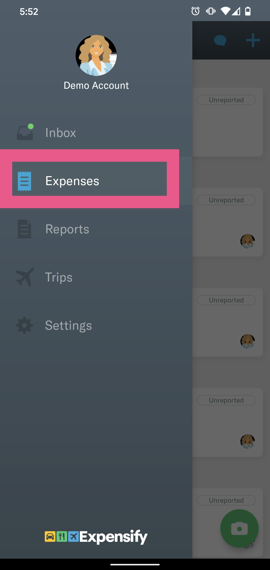
- Navigate to the Expenses screen (Menu > Expenses) and click on the receipt
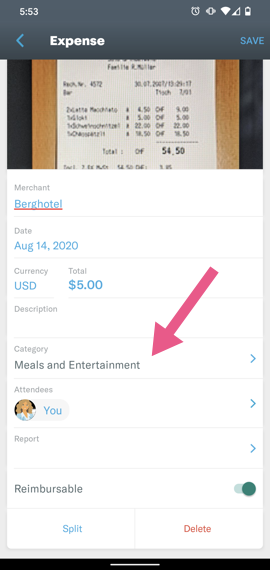
- Expensify will smart scan the receipt to add the date, merchant name, and amount
- You add the category, description, and any other details

Submit Report
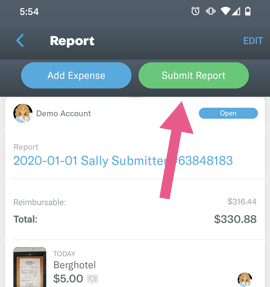
- Navigate to the Report screen (Menu > Reports) and click on the open report with your receipts
- Click the blue button to add more expenses
- Click the green button to submit the report
Leave a Reply